
Most blog posts that fail in search don’t fail because of the writing. They fail because they were written before anyone checked what the searcher wants, what already ranks, and what the site already has.
This guide walks through the exact research workflow we use before writing any SEO or AEO (answer engine optimisation) post, and shows how to run every step inside Analyse8. That covers keyword research, SERP analysis, competitor on-page and backlink checks, content gap analysis, and your own Google Search Console and GA4 data.
How do you write an SEO and AEO optimised blog post?
To write an SEO and AEO optimised blog post, check your own Search Console and GA4 data first, pick a primary keyword with realistic difficulty, study the live SERP and the pages ranking on it, find what those pages miss, then turn that into a brief with question-led headings, direct answers, FAQs and schema.
Here is the full workflow at a glance:
- Check your own data. Use Search Console and GA4 to find existing demand, striking-distance queries, cannibalisation risk and the formats that already work for you.
- Do keyword research. Pick a primary keyword and a handful of secondary and question keywords.
- Analyse the SERP. See who ranks, what type of pages they are, and which People Also Ask questions and AI features show up.
- Audit the top pages. Check word count, titles, meta and on-page issues for the pages you need to beat.
- Check backlinks. Gauge how much authority the ranking sites carry.
- Run a content gap analysis. List the subtopics, questions, examples and formats competitors miss.
- Build the brief. Title tag, meta, slug, H2s and H3s, direct answers, FAQ, schema and internal links.
- Write, publish and measure. Draft from the brief, then track impressions, position and sign-ups.
Step 1: Start with your own Search Console and GA4 data
Before you look at a single competitor, check what your site already has. Your own data tells you three things no keyword tool can: where you already have visibility, which pages could compete with a new post, and which content formats actually engage your audience.
In Analyse8, open AI Chat, pick the Google SEO Expert specialist, and ask in plain English. Here is the prompt we used:
I’m planning a blog post targeting “content gap analysis”. Using Search Console for the last 3 months, show me any queries we already get impressions for that relate to content gaps, keyword research, competitor analysis or SEO tools. Flag striking-distance queries (avg position 8 to 30), and tell me if any existing page could cannibalise a new post on this topic. Then use GA4 to tell me which blog pages get the most engaged sessions and sign-ups so I know what format works for us.
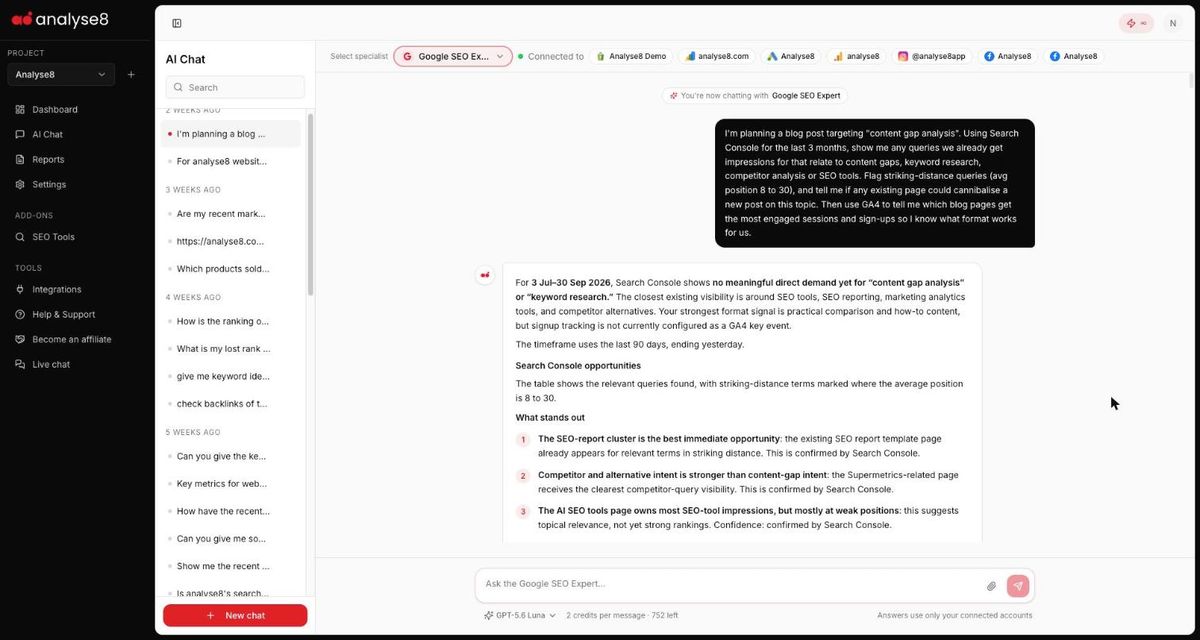
The chat pulled Search Console and GA4 together in one answer and came back with:
- Existing demand: no meaningful impressions yet for “content gap analysis”, so this would be a net-new topic rather than a page refresh.
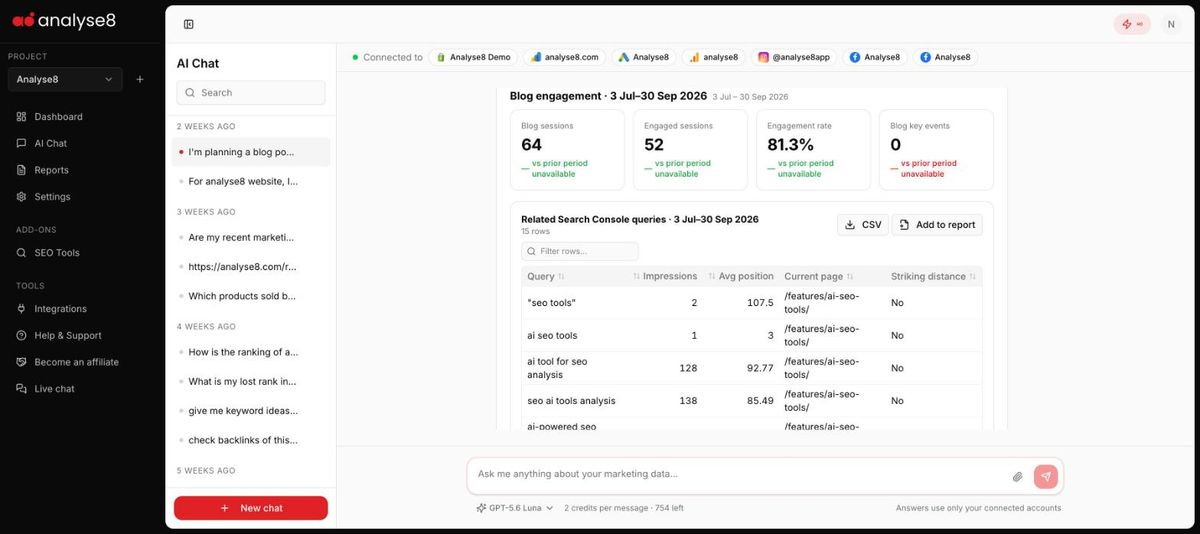
- Striking-distance queries: a table of related queries sitting between positions 8 and 30, each mapped to the page currently ranking. This is gold for internal linking.
- Cannibalisation risk: no direct conflict, but three pages flagged for thematic overlap (an AI SEO tools feature page, a tools listicle and an SEO report template), with advice to keep the new post process-led so it doesn’t compete with them.
- Format signal from GA4: practical explainers and comparison posts drove the most engaged blog sessions, with an 81.3% engagement rate across the blog for the period.
- A tracking gap: it spotted that sign-ups weren’t set up as a GA4 key event, so it couldn’t attribute sign-ups to blog pages yet.
Step 2: Do keyword research and pick your targets
Keyword research tells you which phrasing people actually search, how competitive it is, and which questions sit around the main topic. For AEO, those question keywords matter as much as the head term, because they become your H2s and FAQs.
In Analyse8, go to SEO Tools > Keyword Research > Find keywords. Enter a seed keyword, choose a location and language, and pick how many keywords to return. More rows cost more credits, so 100 is plenty for a single blog post.
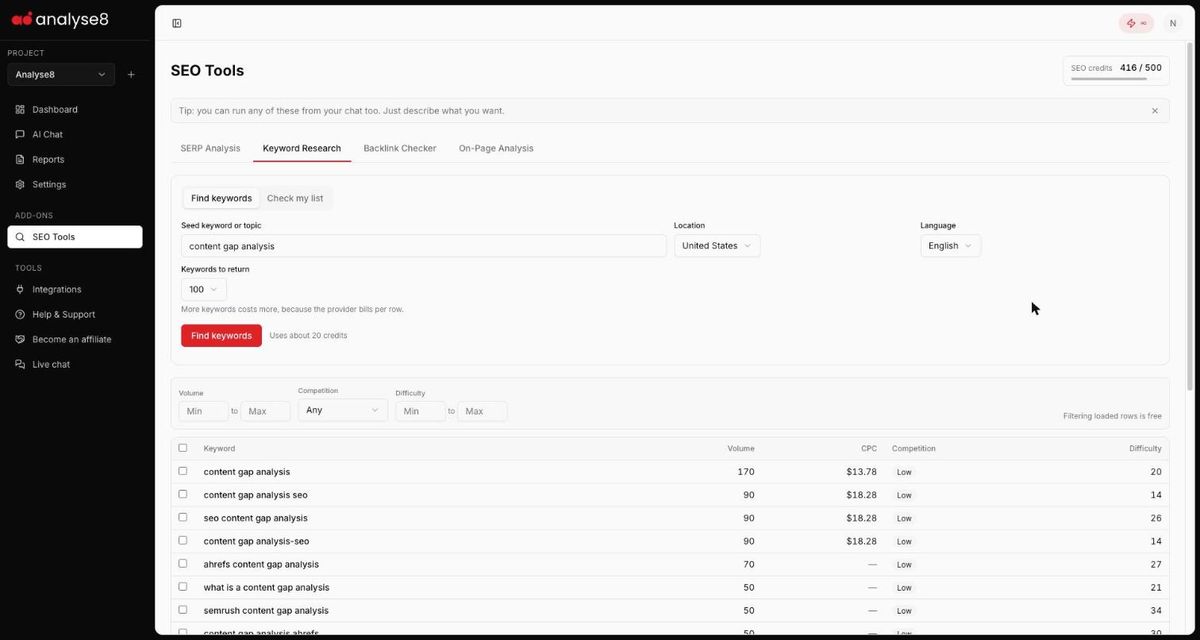
Here is a slice of what came back for the seed “content gap analysis” in the United States:
| Keyword | Monthly volume | Difficulty | Role in the post |
|---|---|---|---|
| content gap analysis | 170 | 20 | Primary keyword |
| what is a content gap analysis | 50 | 21 | Definition H2 |
| how to do a content gap analysis | 40 | 9 | Step-by-step H2 |
| content gap analysis template | 20 | 12 | Template section |
| competitive content gap analysis | 10 | 21 | Competitor H2 |
| semrush content gap analysis | 50 | 34 | Skip (branded) |
| ahrefs content gap analysis | 70 | 27 | Skip (branded) |
A few rules we follow when choosing:
- Pick the primary keyword by intent first, volume second. The head term had the most volume and low difficulty, so it won.
- Turn “what is” and “how to” keywords into question headings. They map cleanly to the questions answer engines pull from.
- Skip branded keywords unless you are writing a comparison post.
- Use the filters (volume, competition, difficulty) to trim the list. Filtering rows you’ve already loaded is free.
Once you’ve ticked your keywords, a bar appears with Add to chat, Copy and Export. Add to chat opens a prompt builder with one-click presets: Write a blog post, Create an outline, Group into clusters, Write meta descriptions and Write ad copy. The prompt is pre-filled with your keywords and volumes, and you can edit it before sending.

Step 3: Analyse the SERP for intent and AEO signals
The SERP tells you what Google thinks the searcher wants. Before writing, you need to know three things: what type of pages rank (guides, tools, forums, listicles), which questions Google surfaces in People Also Ask, and whether an AI Overview appears. Those last two are your AEO targets.
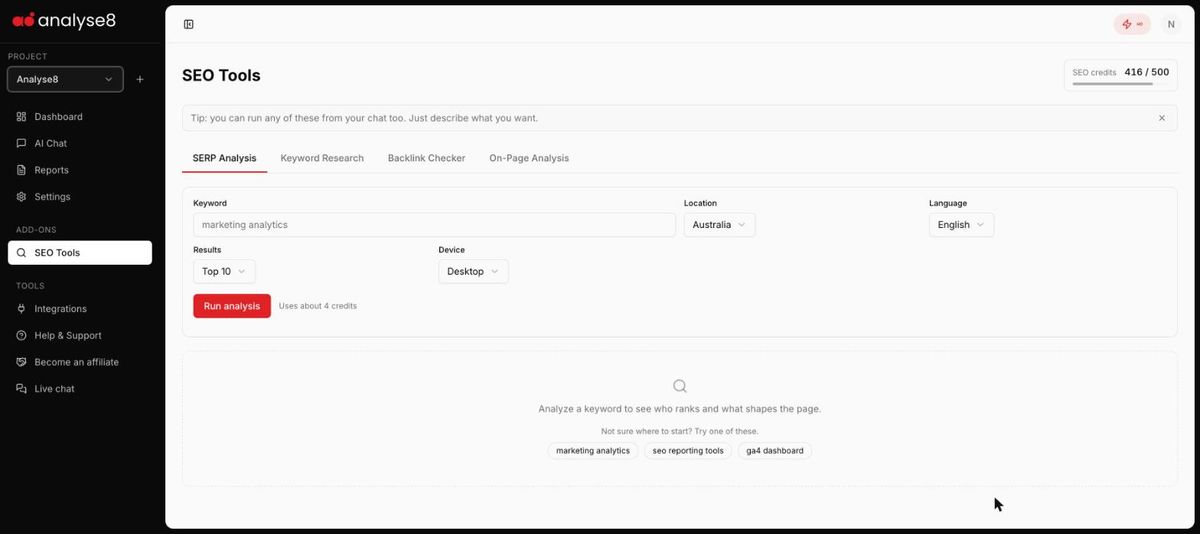
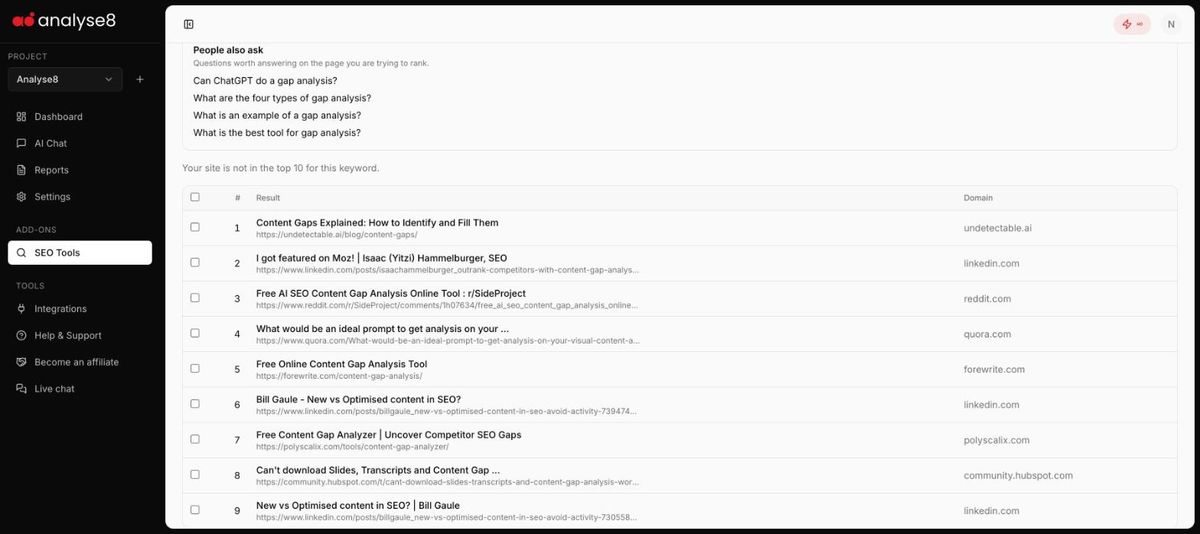
In Analyse8, go to SEO Tools > SERP Analysis. Enter the keyword, location, language, number of results and device, then click Run analysis. A top 10 check uses about 4 credits.
For “content gap analysis” in the US, the results were revealing:
- Only one of the top three results was a full how-to guide. The others were a LinkedIn post and a Reddit thread.
- The rest of page one mixed free tools, Quora, more LinkedIn posts and a HubSpot community thread.
- Google showed People Also Ask questions such as What is the best tool for gap analysis?, Can ChatGPT do a gap analysis? and What are the four types of gap analysis?
- When we ran the same check from chat, it also noted an AI Overview on the results page.
Analyse8 also tells you straight away whether your site is already in the top 10 for the keyword, and lists the People Also Ask questions as questions worth answering on the page you’re trying to rank. Copy those into your brief now.
Select any ranking result and click Add to chat to get presets built for SERP work: Summarise what ranks, What content wins, How to outrank them, Find content gaps and Compare competitors.
Step 4: Audit the pages you need to beat
Once you know who ranks, look at what those pages actually contain. You want each competitor’s title, meta description, word count and any technical issues holding it back. This sets a realistic bar for length and depth, and shows whether you can win on quality alone.
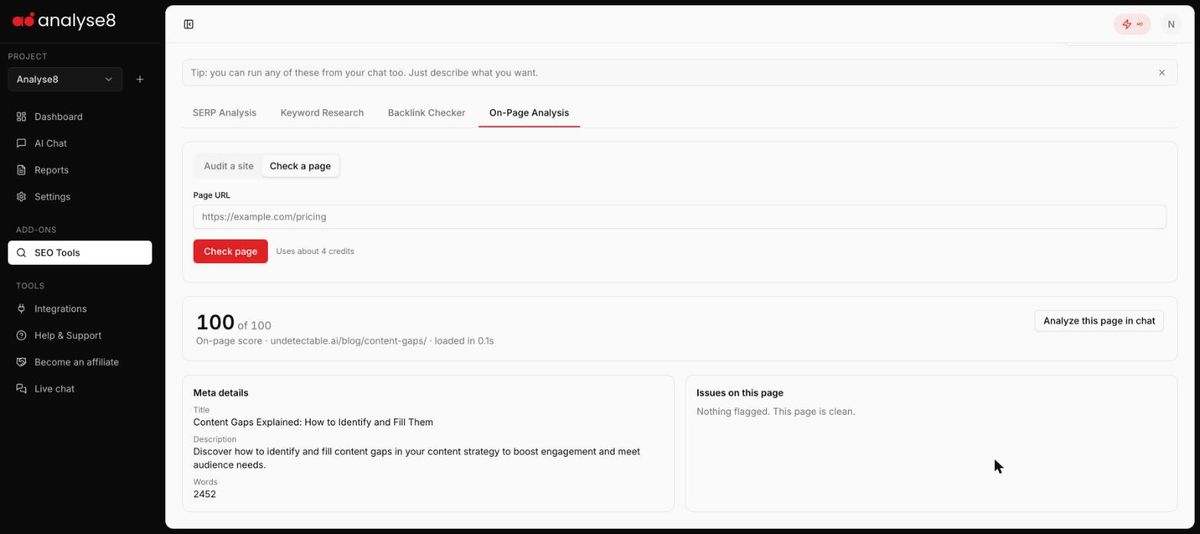
In Analyse8, go to SEO Tools > On-Page Analysis and switch to Check a page. Paste a competitor URL and click Check page (about 4 credits). Use Audit a site instead when you want to crawl your own domain before publishing.
The top-ranking guide for our keyword came back with:
- On-page score: 100 out of 100, with nothing flagged
- Word count: 2,452
- Title: clear and matched to the keyword
- Meta description: accurate and benefit-led
When we audited the top three from chat, the LinkedIn result was flagged for thin content and missing image alt text, and the Reddit page blocked the crawler entirely.
Click Analyze this page in chat on any audit to hand it to the AI for a deeper read of what the page covers and what it leaves out.
Step 5: Check backlinks to judge how hard it will be
Keyword difficulty is an estimate. A backlink check on the sites that rank shows you what you’re really up against. If the leader has a huge, authoritative link profile, you may need a stronger angle, internal links and some promotion. If it’s thin or spammy, good content can win on its own.
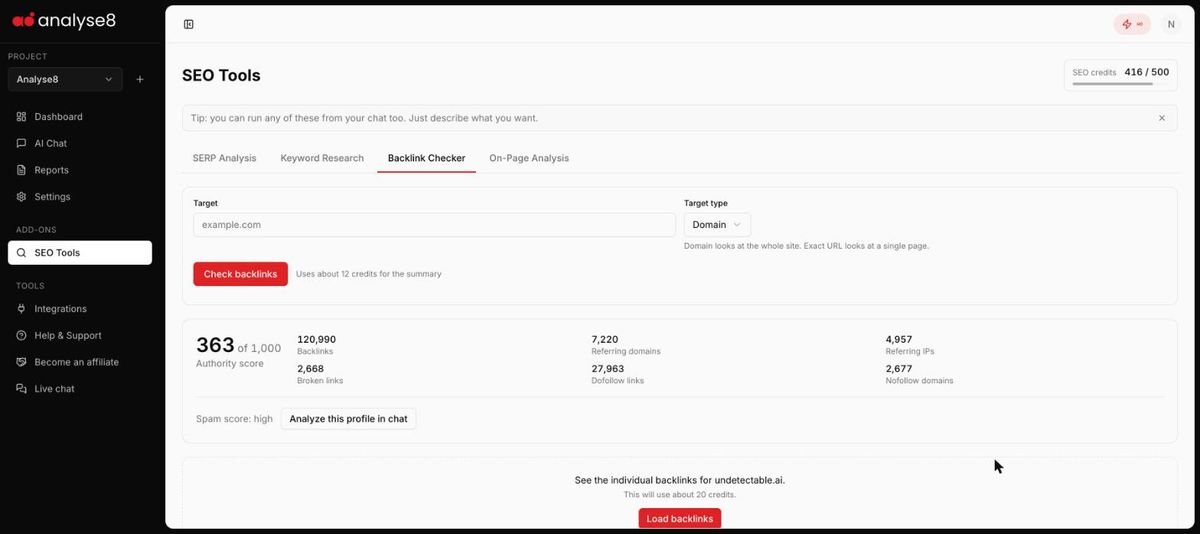
In Analyse8, go to SEO Tools > Backlink Checker. Enter a target, choose Domain (the whole site) or Exact URL (one page), then click Check backlinks. The summary costs about 12 credits.
For the domain behind the top-ranking guide, the summary showed:
| Metric | Value |
|---|---|
| Authority score | 363 of 1,000 |
| Backlinks | 120,990 |
| Referring domains | 7,220 |
| Dofollow links | 27,963 |
| Spam score | High |
Plenty of links, but a high spam score. Raw link counts alone don’t guarantee a page stays on top, so a genuinely better, more useful page has a real shot here.
Need to see the actual links? Click Load backlinks for the full list (about 20 credits), or Analyze this profile in chat to have the AI interpret it for you.
Keyword research, SERP analysis, on-page and backlink checks, plus your own Search Console and GA4 data. Free to start.
Try Analyse8 freeStep 6: Run a content gap analysis against the top results
A content gap analysis compares what the ranking pages cover with what searchers need, so you can find the subtopics, questions, examples and formats nobody handles well. This is where your post earns the right to rank. Matching competitors gets you into the conversation. Covering what they miss gets you chosen.
You can do this by hand, reading each page and listing the gaps. Or you can hand it to chat, which runs the SERP and on-page checks for you and reasons over the results. In the same Google SEO Expert chat as Step 1, we asked:
Now run a SERP analysis for “content gap analysis” in the United States. Then check the on-page details of the top 3 ranking articles and do a content gap analysis: which subtopics, questions, examples and formats are they missing that we should cover? Also list the People Also Ask questions we should answer directly.
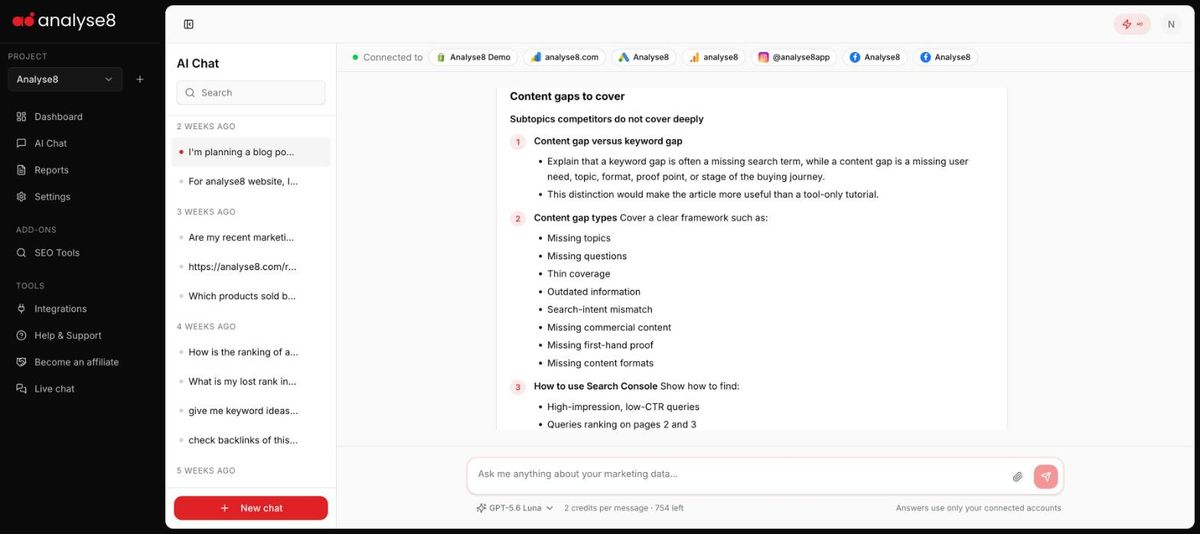
The chat ran the SERP analysis and three page audits on its own, then returned a structured gap report. The most useful findings:
- Missing subtopics: the difference between a content gap and a keyword gap, a clear list of gap types, a Search Console workflow, cannibalisation checks and a prioritisation model.
- Under-answered questions: how to decide between a new page and an update, how to prioritise dozens of gaps, and how to measure whether filling a gap worked.
- Missing examples: none of the top pages had a worked example comparing one site against three competitors with a priority score.
- Missing formats: a downloadable template, a scoring table, a decision tree and annotated screenshots.
Step 7: Turn the research into an SEO and AEO brief
A good brief is the bridge between research and writing. It locks in the keyword targets, the structure, the answers each section must give, and how the page will be marked up and linked. For AEO, the brief is where you make the content easy for answer engines to extract and quote.
In the same chat, switch the specialist from Google SEO Expert to SEO Blog Writer using the selector at the top. It keeps all the research from earlier in the conversation. We asked:
Using everything above, create an SEO and AEO optimised brief and outline for the post. Primary keyword: content gap analysis. Secondary: how to do a content gap analysis, what is a content gap analysis, content gap analysis template, competitive content gap analysis. Include title tag, meta description, URL slug, H2/H3 structure, a 40-60 word direct answer under each key H2, FAQ section from the PAA questions, schema recommendations and internal links.
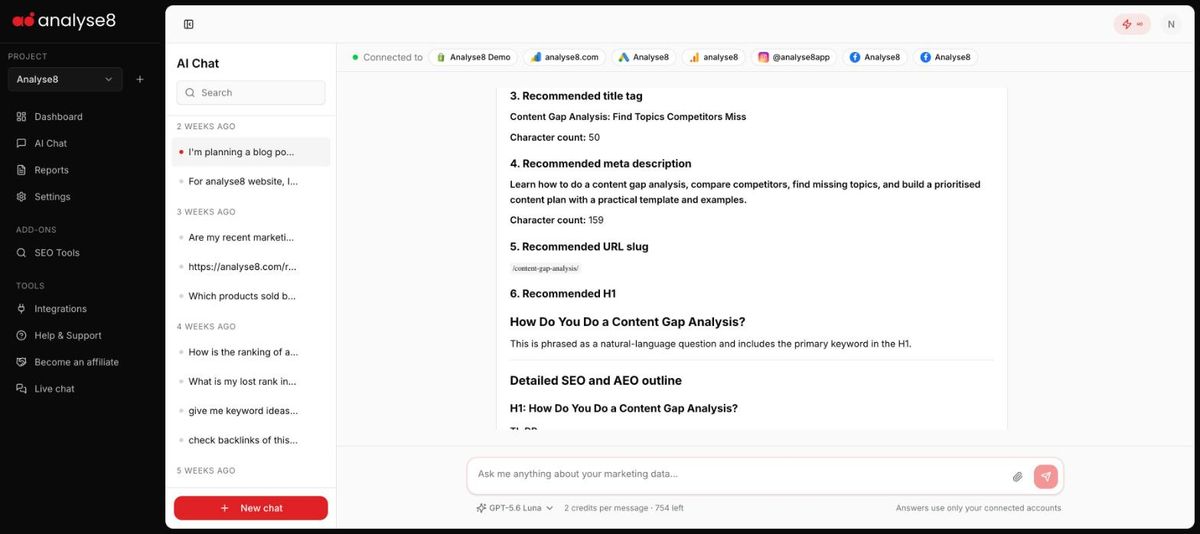
The brief it returned included:
| Brief element | What the SEO Blog Writer produced |
|---|---|
| Title tag | Content Gap Analysis: Find Topics Competitors Miss (50 characters) |
| Meta description | A 159-character description using the primary and “how to” keywords |
| URL slug | /content-gap-analysis/ |
| H1 | Phrased as a natural question with the primary keyword |
| TL;DR | Four bullets directly under the H1 |
| H2s | Question-led, each opening with a 40 to 60 word direct answer |
| Tables | A competitor comparison grid, a 1 to 5 scoring model and template columns |
| FAQ | Short answers to the People Also Ask questions |
| Schema | BlogPosting plus FAQPage, using only questions visible on the page |
| Internal links | Four existing pages, each with a suggested placement and anchor |
Step 8: Write, publish and measure
With the brief done, the writing is the easy part. Ask the SEO Blog Writer to draft the full post from the brief, section by section, so you can review each part before moving on. Then add what only you can: real examples, screenshots, opinions and results from your own work. That first-hand experience is what separates a post that ranks from one that just exists.
Before you hit publish:
- Put the direct answer to the main question in the first 100 words.
- Keep each H2’s opening answer self-contained, so it still makes sense if an AI pulls it out on its own.
- Add the FAQ section and FAQPage schema, using only questions that appear on the page.
- Add the internal links from the brief, and link to the new post from the striking-distance pages you found in Step 1.
- Run On-Page Analysis > Check a page on your live URL to catch missing meta, alt text or thin sections.
- Make sure your sign-up or lead event is a GA4 key event, so you can see which posts actually convert.
After publishing, come back to chat a few weeks later and ask something like:
How is /blog/content-gap-analysis/ doing in Search Console since it went live? Show impressions, clicks, average position and the queries it ranks for, and tell me if any of our other pages lost visibility.
That closes the loop. You see whether the post is gaining ground, which new questions it’s appearing for (more FAQ material), and whether it’s stealing traffic from your own pages.
What does this workflow cost in credits?
The standalone research for one post used about 40 SEO credits in our run. The SEO Tools add-on includes 500 SEO credits per billing cycle, so you can research many posts a month. See pricing for plan details.
| Task | Approx. SEO credits |
|---|---|
| Keyword Research (100 keywords) | 20 |
| SERP Analysis (top 10) | 4 |
| On-Page: check a page | 4 |
| Backlink Checker summary | 12 |
| Backlink Checker full link list | 20 |
| On-Page: site audit (up to 100 pages) | 40 |
AEO checklist for every blog post
- Main question answered in the first 100 words
- H2s phrased as the questions people actually ask
- A 40 to 60 word direct answer at the top of each key H2
- People Also Ask questions covered in an FAQ section
- Tables, steps and lists where the content has that shape
- First-hand examples, data or screenshots competitors don’t have
- BlogPosting and FAQPage schema, matching visible content
- A named author with relevant experience
- Internal links to and from related pages
- Tracking in place to measure impressions, clicks and conversions
Every step in this guide ran inside Analyse8, in one sitting, starting from a single keyword. Try it on your next post and add the SEO Tools add-on when you’re ready.
SEO Tools add-onGet started freeFAQ
What is the difference between SEO and AEO for blog posts?
SEO focuses on ranking pages in search results. AEO (answer engine optimisation) focuses on making your content easy for AI Overviews, chat assistants and featured snippets to extract and quote. In practice they overlap: clear question headings, direct answers and structured data help both.
Can I run SEO tools from chat in Analyse8?
Yes. Keyword research, SERP analysis, backlink checks and on-page audits can all be run by describing what you want in AI Chat. You can also run them in SEO Tools and send results to chat with Add to chat.
Do I need Search Console and GA4 connected?
Not for SEO Tools, which work on any keyword or URL. But connecting them is what lets chat check your existing rankings, spot cannibalisation and tell you which formats engage your audience. See the integrations page for what you can connect.
Which AI Specialist should I use for blog posts?
Use the Google SEO Expert for research, rankings and content gaps, then switch to the SEO Blog Writer for briefs, outlines, meta descriptions, schema and drafts. You can switch mid-conversation without losing context.
How long should an SEO blog post be?
There is no fixed length. Check the word count of the pages ranking for your keyword with On-Page Analysis, then aim to cover the topic more completely, not just at greater length.